Put your dashboards on your own page
Showing your clients their own numbers inside your own portal, without sending them to a login page of someone else's, sounds like an iframe. It stops being one the moment the portal has its own brand, its own dark mode, a second language, and a client who must never see another client's rows.
So we built the pieces that turn it into a few lines of HTML: a read-only public API for whatever you share from a dashboard, an open source library that draws the same charts, KPI tiles and tables the product draws, and a way for your server to hand each visitor a pass that works for ten minutes.
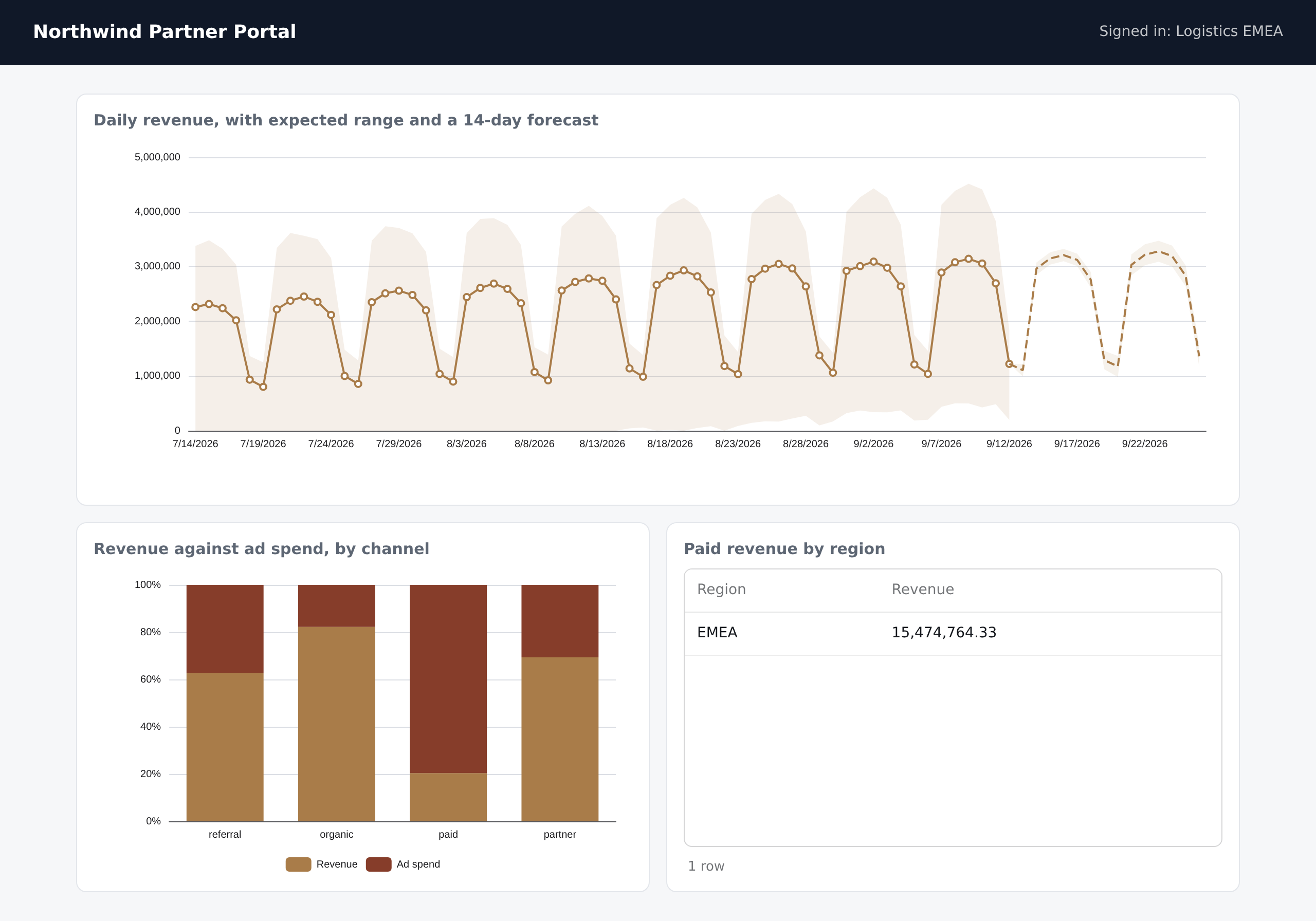
That is the portal for a visitor from EMEA. This is the same page for a visitor from North America:
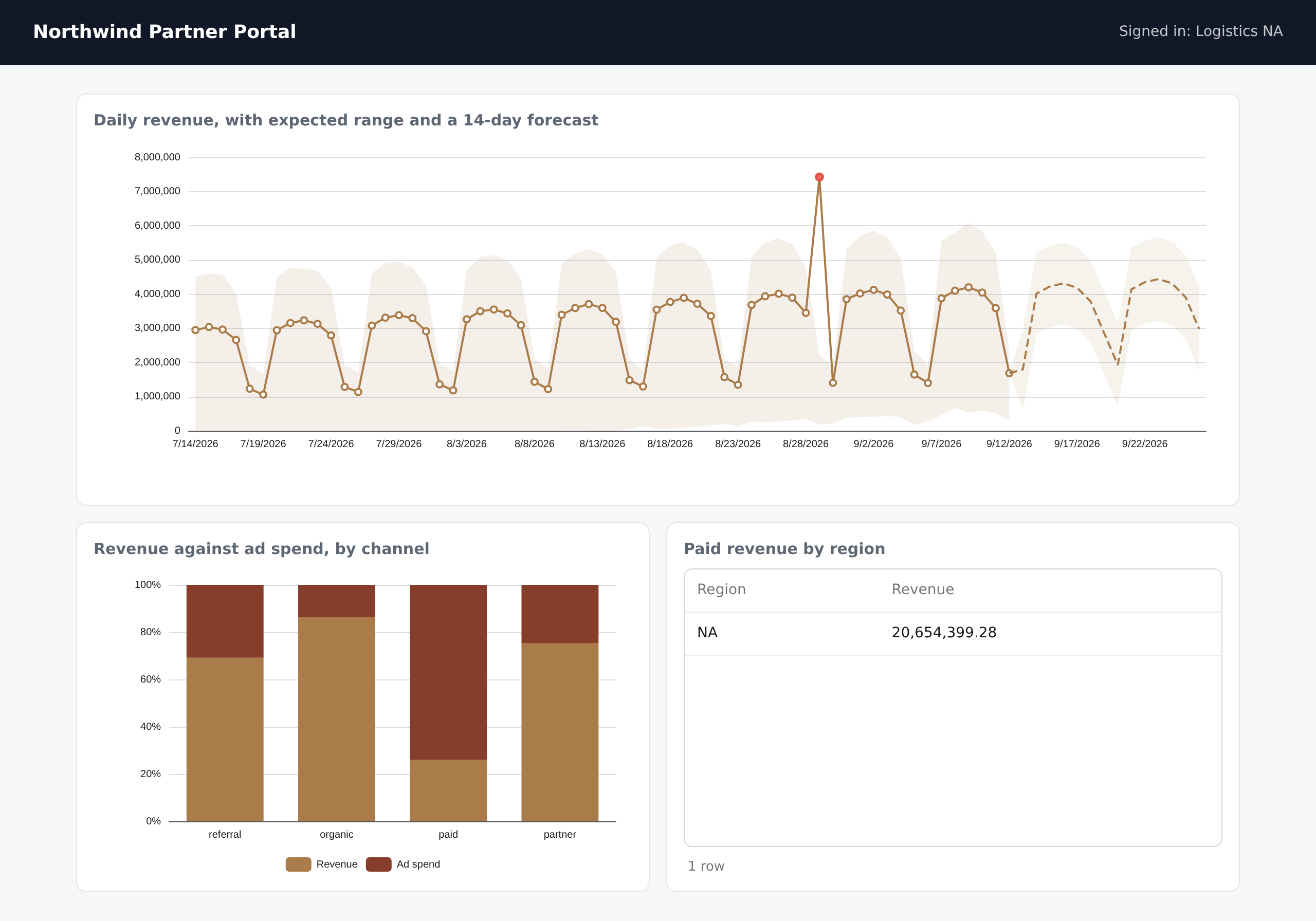
The portal is made up and the widgets are from our demo workspace. Apart from the name in the corner, the two pages are the same HTML, and that HTML contains no credential at all. What differs is the pass each visitor was given, which is why the figures differ.
A token in a page is a token in public
The first version of this was simpler and worse. The credential was the share link's token, written into the page, and the library sent it as a bearer header. We said the token was the permission, and for a dashboard that anyone holding the link may see, that is true and fine.
It is the wrong model for the case the feature is sold for. A browser can only send what the page contains, so a token in the page is readable by every visitor, from the network tab or the page source, and it lives as long as the link does. For a portal with several clients that means whoever copies it can read what that link shows for as long as it exists. Hiding it is not an option, because the page needs it.
So the page does not get it. The pattern is the one payment libraries use.
- You create an embed key in Settings, as an API token of type Embed key. It lives on your server and never reaches a browser. It can read no data at all. All it can do is ask us for sessions.
- When a visitor opens a page, your server, which already knows who they are, trades the key for a session:
curl -X POST https://eventhorizondata.com/api/v1/embed-sessions \
  -H "Authorization: Bearer $EH_EMBED_KEY" \
  -H "Content-Type: application/json" \
  -d '{
    "share_link_id": "SHARE_LINK_ID",
    "expires_in": 600,
    "row_scope": [{ "event_bucket_id": "BUCKET_ID", "column_key": "region", "values": ["EMEA"] }]
  }'
- The page gets only the session token that comes back. It works for the seconds you asked for, between one and sixty minutes, and ten by default. After that it stops.
On the page it is one tag. /eh/session is your own endpoint, which makes the request above for whoever is logged in and returns the answer:
<script src="https://cdn.jsdelivr.net/npm/echarts@6/dist/echarts.min.js"></script>
<script src="https://cdn.jsdelivr.net/npm/@event-horizon-data/charts/dist/eh-chart.global.js"></script>

<eh-chart token-url="/eh/session" widget="WIDGET_ID" style="height: 320px"></eh-chart>
With a bundler it is npm install @event-horizon-data/charts echarts, and createClient({ token: tokenFromUrl('/eh/session') }). The library is MIT licensed and about 25 kB gzipped on top of Apache ECharts. It asks for a session when it first needs one, again shortly before it expires, and once more if the API answers 404 to a session it handed out earlier. A page with twelve charts makes one request for a session, not twelve.
What a copied session can do
Anyone can still copy a session out of the network tab. The design is about how little that gets them.
- It shows only the viewer's rows. The row scope you name is signed into the token, so a visitor cannot edit it, and the server applies it on every read.
- It can only narrow, never widen. The share link has its own row scope, and the session's is added to it. A session asking for another region by name gets zero rows, and there is a test that does exactly that.
- It dies in minutes, not with the link.
- Revoking works at once. Every read re-checks the link and the key that vouched for the session. Revoke the key, or switch the link off, and every session under it stops, even though nothing about a session is stored on our side.
- A leaked embed key reads nothing. It cannot be used on the data API, and the worst it can do is mint sessions for links its own account owns.
None of this makes the page secret. A visitor can still see their own rows, which is the point. What it stops is anyone using the page to see more, or for longer, than the visitor was entitled to.
The rest of the surface
The public API is read only, answers to any origin without ever using credentials, and is limited to 3,000 requests a minute per share link, so minting more sessions buys nobody more requests. The contract is published as OpenAPI 3.1 at /api/v1/public/openapi.json, and a test fails the build whenever the document and the code disagree.
A chart on a stranger's page can ask for a different slice. Drag across a time series and it asks for that window at a finer grain, and a click can narrow the other widgets. Both are parameters the caller controls, so both are the obvious place to try to widen what a link may see. They only narrow. Filters arrive as JSON in a single query parameter instead of the bracketed form most APIs use, because a query string cannot write an empty list. A filter that means match nothing would reach the server as no filter at all, and since row scope travels through the same kind of list, that would be a read that fails open. A JSON string cannot be dropped that way, and the server answers an empty list with an error rather than guessing.
You can tell the library which time zone to label times in, Europe/Lisbon or the visitor's own. We apply it only to hourly and finer points. A day bucket is a UTC calendar day, so labelling it in another zone would not move it, it would mislabel which day it is.
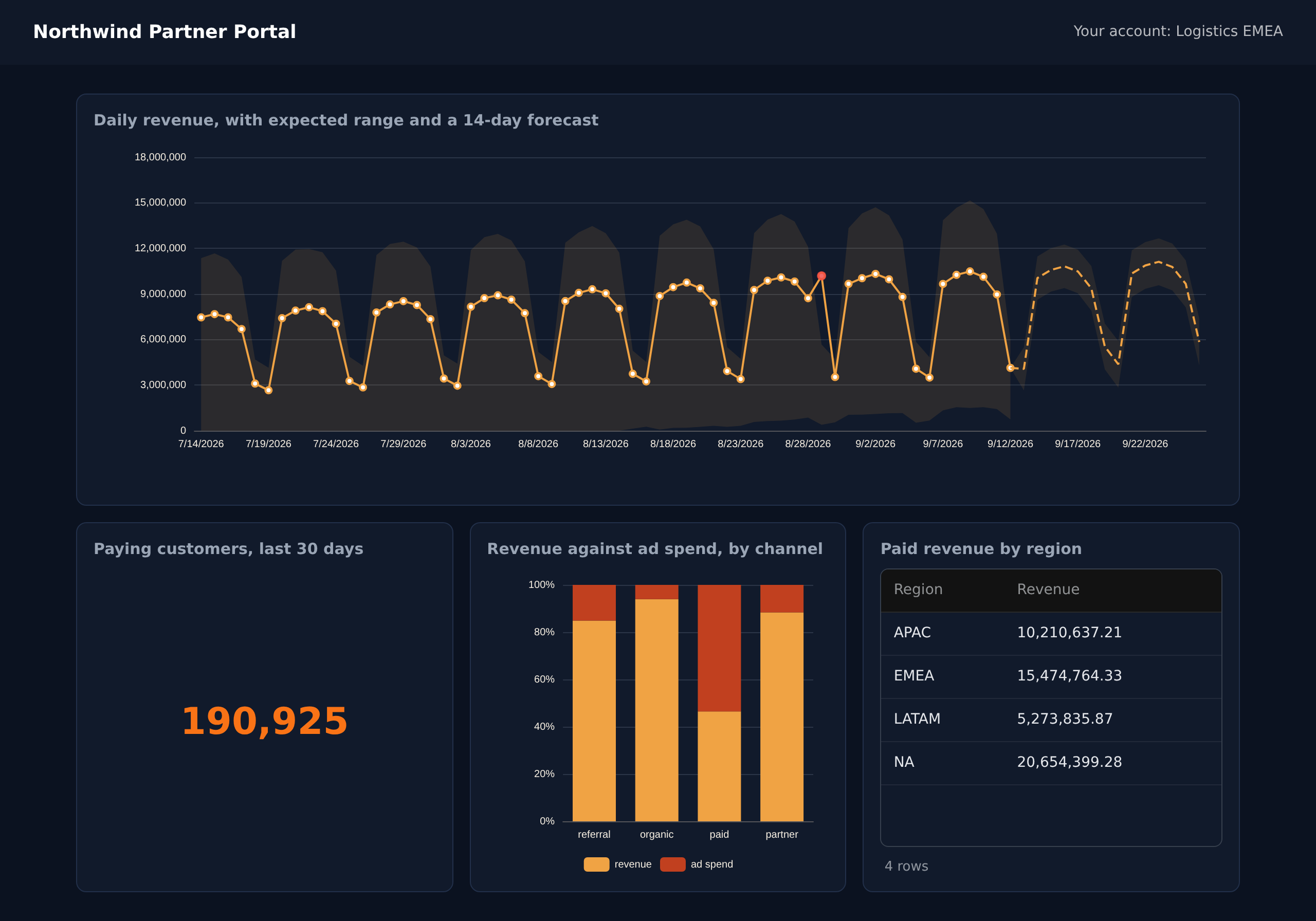
theme="auto" follows the visitor's colour scheme while the page is open, and light or dark pin it:
What we found while building it
We keep these in the open, because each one came from looking at a real page rather than reading a test.
The first dark render had a white table header with pale text on it, and gridlines as loud as the data, because a table inherits its colours from the host page and the host had never said it was dark. The second page drew its table twice: a custom element that arrives with three attributes is upgraded three times, and a fourth mount stacked on top of them. And a notebook endpoint of ours, POST /data/sql, answered every call with a CSRF error, because a notebook has no cookie to hold the token that check wants. All three are fixed and each has a test that fails if the fix is removed.
Try it
The package is @event-horizon-data/charts on npm, the reference is in our docs, and a share link plus an embed key is all it takes to try it on a dashboard you already have.